

Cua Spaces: why give your AI agent a separate computer?
Cua Spaces: why give your AI agent a separate computer?
You want an AI agent to do useful work without handing it your personal computer, document folders and signed-in accounts. Cua Spaces offers a practical separation: give the agent another computing environment. With the Hermes Agent plugin, that initially means moving terminal operations, file handling and code execution. It does not mean every tool moves with them, or that connected business accounts can no longer affect the outside world.
For a business owner, the decision is therefore about scope: which work moves, which permissions it needs, and who approves anything that commits the company.
Think of two computers with different jobs
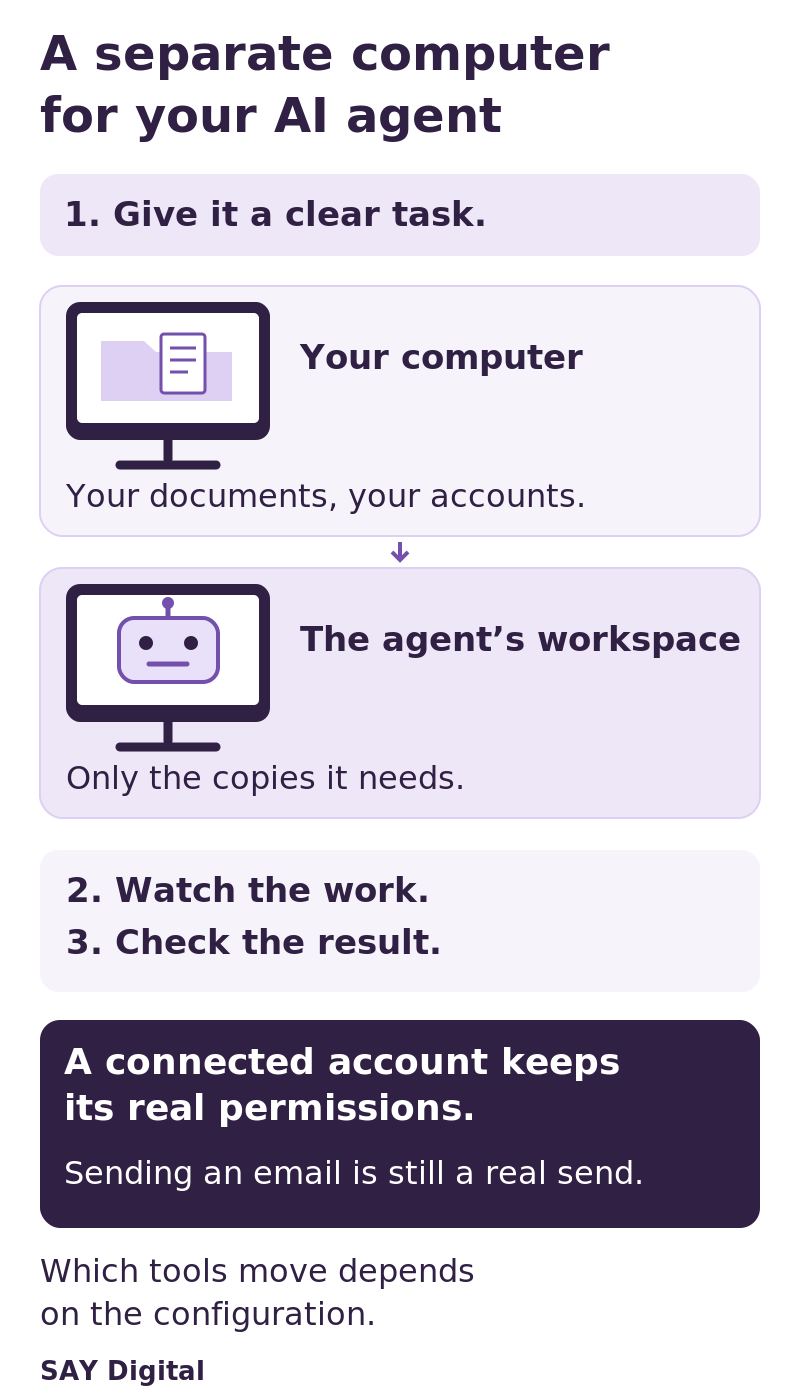
The first computer is your everyday workstation, with your documents and email. The second holds only what the agent needs for its assignment. It can be a virtual machine rather than another physical device. This is a useful way to separate your working environment from the place where the agent handles its files.
Cua describes a Space as an isolated machine running on your hardware or in your own cloud account. In the plugin arrangement examined here, Hermes itself stays where it already runs. Its terminal, file and code tools operate in the Space instead. This moves a set of operations, not automatically the whole agent, its memory and every connection. Our business guide to Hermes Agent explains the distinction between the model interpreting a request and the tools carrying it out.
Check where each tool actually runs
The terminal launches programs, file tools read and change documents, and code execution runs a program. The plugin sends these operations to the Space. This reduces their overlap with your personal workstation, provided the task uses the tools you have checked.
The browser and computer_use, which lets an agent interact with a graphical interface, need a separate check. The README documents placement inside a Linux Space under specific conditions: Hermes must include change #142225, newer than v0.22.2; Cua must be version 0.7.0 or later; and the desktop components and configuration must support it. With an older Hermes version, these tools continue to use the original machine. The plugins.isolation: host setting also prevents their relocation.
For macOS and Windows Spaces, the plugin does not automatically move the browser, computer_use or Bot Desktop into the Space. Before signing in to a business service, ask whoever sets up the pilot to confirm where each tool runs. A file saved inside the Space is not evidence that the browser is there too.
A separate machine does not cancel account permissions
Separating the workstation limits direct access to your personal environment. But a connected email account with permission to send can still send outside that machine. An account authorised to edit or delete records in an online service retains those powers. Local isolation and permissions in external services address different boundaries.
Use a dedicated account with only the access required for the assignment, rather than your administrator session. If the trial only needs a draft document, do not grant publishing rights for convenience. Our article on who controls an AI agent’s right to act examines this chain of authorisation.
A dedicated machine also does not mean all data stays local. Depending on the integration, a remote model may receive text, tool output or screenshots. Connected services still exchange data; a remotely hosted Space adds transfers of its own. Assess where operations run, who receives information and how it is retained as separate questions.
Watching the desktop is not the same as approving actions
Cua lets you watch the Space’s desktop and interact through its viewer. That can help explain a visible operation or let you take over an interface. It is not a complete view of commands, service calls or information sent elsewhere. The README says Hermes keeps working alongside a user interacting with the viewer. Clicking into it is therefore not a guaranteed stop mechanism.
There is another important difference to understand before a trial. For Spaces the plugin creates, it skips Hermes’s risky-command confirmation prompts, relying on the isolated environment. For an existing Space explicitly selected by name, the documentation says those confirmations remain. Fewer prompts should not be read as lower risk in every respect. Material the agent reads may still try to misuse available permissions, as our explanation of malicious instructions encountered during research shows.
A bounded trial: prepare a comparison, without sending it
Consider this illustrative test, not a customer case or a reported result. An operations manager wants a comparison of supplier proposals. She provides redacted copies in a dedicated Space and requests a comparison sheet, references to the supporting passages and a list of uncertainties.
The assignment excludes sending messages or changing the original records. Before starting, the team checks tool placement, removes unnecessary accounts and names the person responsible for stopping execution. That reviewer checks amounts, references and omissions before anyone uses the document. The trial should establish whether the output is usable, which permissions were necessary and how much checking remains for the team.
The team should check more than the finished table: it should also confirm which tools and accounts were used. Keep execution records that allow that comparison with the agreed scope. Decide in advance which uncertainty requires the agent to stop rather than guess. These are proposed acceptance conditions, not claims that this plugin enforces every control itself.
Budget for the whole assignment, not just the machine
An isolated environment is not free simply because it runs on hardware you own. It consumes computing resources, administration and review time. Model usage and hosting may add charges. Check the applicable commercial terms rather than treating a possible introductory promotion as the ongoing cost.
Before expanding the pilot, require a checkable deliverable, understood permissions and a tested stop procedure. For a business in Paris, a discussion with SAY Digital can help frame a controlled pilot and the approvals it needs, subject to your circumstances. It is not a guarantee of compatibility or results. Discover SAY Digital.
Official sources
- Official Hermes on Cua Spaces plugin README: tool placement, version requirements, confirmation behaviour and operating-system limits.
- Official Cua repository and Cua documentation: product context. Sources collected on 30 October 2026; capabilities and commercial terms may change.