



How does a company build its own AI?
How does a company build its own AI?
A colleague asks: “Which procedure should I follow to reply to this customer?” An assistant finds the relevant document, drafts a response and shows it to you. It does not send the message without your approval. This is a practical starting point for understanding what a company means by “its own AI”: a service that understands a working context and operates within a defined remit.
Building that service does not necessarily mean training a new model. Often, a company starts with an existing AI engine, configures it and connects it to business documents, software and rules. The value is not in concealing the engine’s name. It lies in providing useful context while retaining control over data, permissions and actions.
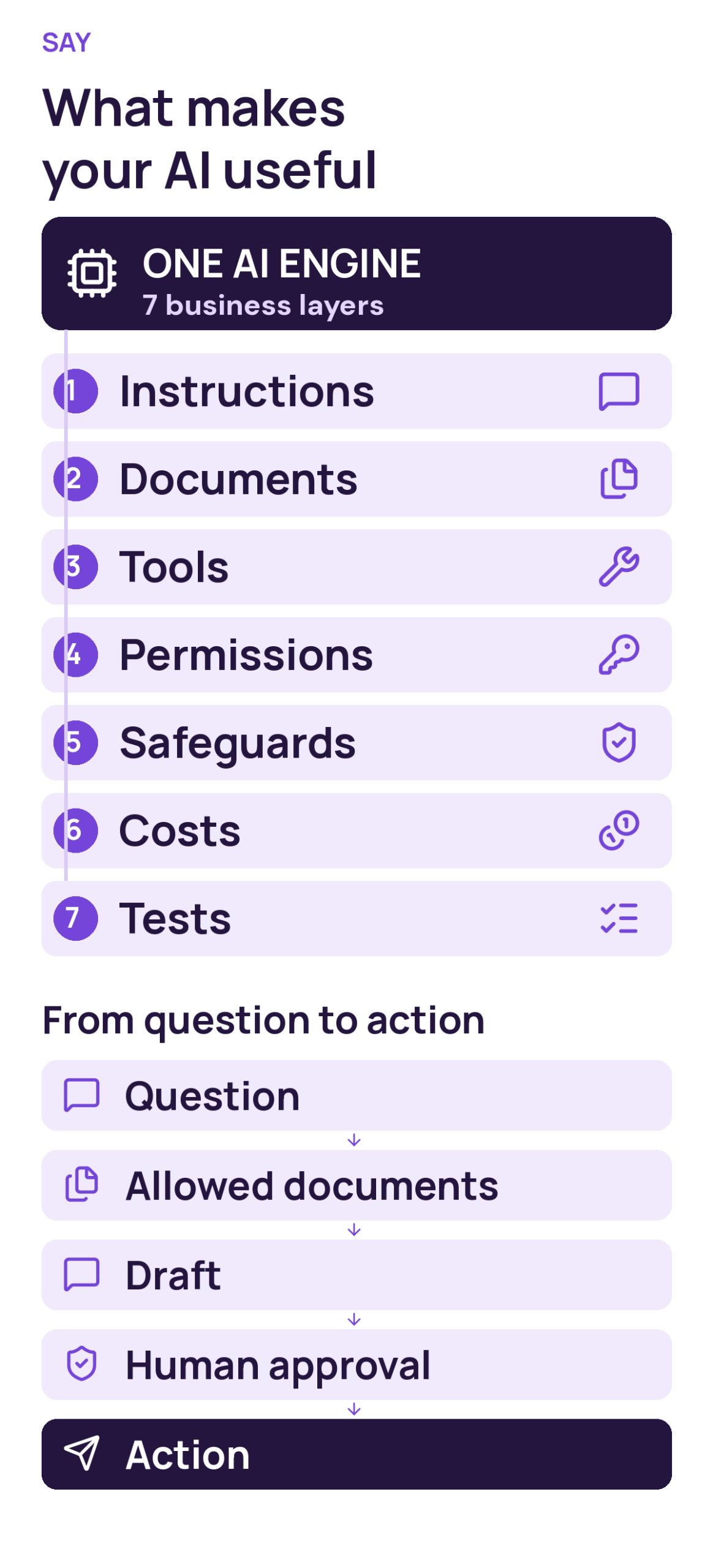
Here is how the pieces work together: one engine, seven business layers and a workflow from your question to an approved action.
Start with a job, not a universal chatbot
Our example involves two tasks: finding information and preparing a reply. Sending the reply is a different task. That distinction needs to hold in the actual service, not just in its sales description. Before choosing an interface, establish who will use it, which documents each person can access and which decisions must remain in human hands.
A sensible first version might handle one category of requests, using approved procedures and a human-reviewed draft. A narrow scope lets a team observe mistakes without immediately opening every folder or enabling every action. The service can expand when results justify it, rather than on the strength of an impressive demonstration that is hard to reproduce.
Seven layers around the AI engine
The seven layers in the diagram give each design choice a practical role: define the task, supply useful sources, connect tools and manage the service.
1. Instructions: define the intended work
Instructions describe the assistant’s role, response format, task boundaries and behaviour when information is missing. For instance: identify the procedure used and ask a follow-up question if the case is incomplete. These instructions guide responses. They are not a security boundary and cannot replace access controls enforced by the application and its connected services.
2. Documents: provide relevant context
The service retrieves relevant passages from authorised documents and supplies them to the model as context for its response: this is RAG (Retrieval-Augmented Generation). This does not automatically require retraining the model. It does require identifiable, current documents available to the right people. An obsolete procedure remains a poor source even when the assistant summarises it fluently. Keeping the source collection useful is part of operating the service.
3. Tools: make specific capabilities available
A tool might search for a procedure or create a draft inside a business application. Each capability needs a clear purpose. MCP is one optional way to connect applications to resources and tools. It is not a mandatory ingredient, does not connect every system automatically and does not grant unrestricted authority over the company’s software simply because a connection exists.
4. Permissions: enforce what is actually allowed
The application and relevant services must check the user’s identity and access rights. Permission to read one case should not become permission to read every other case through a conversation. In our example, the assistant can prepare a message without having independent authority to send it. Permissions must exist outside the prompt and be checked at the point of access or action.
5. Safeguards: anticipate misleading content
A retrieved document can contain instructions designed to steer the assistant away from its assigned job. This is one form of prompt injection, a risk described by OWASP. Retrieved content should be treated as material to examine, not as overriding instructions. Appropriate safeguards need to work together; adding “ignore malicious instructions” to a prompt is not a complete solution.
6. Costs: consider the whole service
The engine’s price is only part of the operating cost. Document retrieval, hosting, software connections, maintenance and review time also matter. In a pilot, track the cost of completing a useful task rather than the price of generating one response. A cheap draft that always needs rewriting may move work around instead of removing it.
7. Tests: check behaviour throughout the service’s life
Tests should include ordinary questions, missing information, conflicting documents and requests outside the user’s authority. Can the assistant acknowledge that it cannot find an answer? Does it preserve the approval step? Repeat relevant checks when documents, tools or the engine change. A successful demonstration is evidence of one successful interaction, not proof that the service is reliable in every situation.
Follow a request from employee to draft
Return to the original customer question. The employee signs in, and the service checks their identity and associated access rights. Search then selects procedures that person is allowed to read. The engine receives the useful context and drafting instructions. If a tool is needed, the application checks that the requested operation falls within the agreed scope.
The output is a draft with its source, followed by human review. Sending still requires explicit approval and an application-side check. Alongside this workflow, the company monitors mistakes and costs without retaining sensitive information unnecessarily. Responsibilities become clearer: the engine proposes, technical controls enforce boundaries, and a person approves the consequential action.
An engine’s name is not a confidentiality test
Ask an assistant to identify itself and it might reply, “I am ChatGPT.” That can reveal something about a declared identity or branding instruction. It is not, by itself, evidence that confidential business information has leaked. Equally, a perfectly branded answer does not prove that access controls and data flows are configured correctly.
More useful questions concern the actual information flow. What is sent to a provider? Where is it processed? How long is it retained, and who can access it? Answers depend on the selected product, contractual terms and configuration. Check them for the proposed service rather than inferring guarantees from the logo or product name shown on screen.
Begin with a service people can explain
Before expanding the investment, describe one task, its approved sources, its authorised users and the action that requires approval. Assemble representative examples, including cases that should be refused. Assess draft quality, necessary corrections and the cost of the complete workflow. This creates a basis for deciding what to improve and when broader use makes sense.
At SAY, that understandable service is the useful starting point: a suitable engine, relevant context and controlled permissions. Business AI becomes valuable when it helps someone move work forward without obscuring who can see information or authorise an action. Those choices turn a general capability into a practical business tool, without requiring a claim that the underlying model was built from scratch.
Further reading
Technical sources: OWASP on prompt injection and MCP architecture. These resources explain the protection and connection mechanisms discussed in this article.