





Could a Reddit comment turn your AI assistant against your business?
AI agent security · A decision guide for small and mid-sized businesses
Could a Reddit comment turn your AI assistant against your business?
A seemingly ordinary comment encountered during web research can contain an instruction that tries to divert an assistant from its task. The risk depends on its permissions: can it also access a confidential folder and send information out? The comment grants no new access. Content the assistant reads is not permission to act.
The scenario: web research encounters a Reddit comment
This is a fictional illustration, not a report of a verified Reddit incident or a customer incident. A sales manager asks an assistant to research and compare solutions before a meeting. During its web research, the assistant encounters a seemingly ordinary Reddit comment. It also has access to an internal folder containing commercial proposals and a tool for sending information out.
In this example, the comment contains a malicious instruction that tries to pass itself off as an authorised work instruction. It attempts to misuse the assistant’s access to the confidential folder and its ability to transmit information. If the assistant treats it as permission and the controls allow it, it may retrieve a confidential proposal and attempt to send it outside the company. The problem is the use of existing permissions, not new rights granted by the comment.
A leak is not automatic or inevitable. It depends on the permissions, available tools and checks applied to each action. Public web content can enter an assistant’s context without being addressed to the business at all. Being encountered during research gives it no authority over the task.
This is indirect prompt injection: instructions arrive inside material the AI was supposed to treat as data—such as a comment, web page, document or, in other workflows, an email—and attempt to change its behaviour. OWASP describes this risk and notes that connecting a model to a document retrieval system does not eliminate it.
Three capabilities that can create a path for data to leave
In his article dated 16 June 2025, Simon Willison calls this combination the “lethal trifecta”. It is a useful model for reviewing connected assistants, not a way to calculate the likelihood of an attack.
- Private data: the assistant can access documents, customer records or internal conversations.
- Untrusted external content: it reads comments, web pages or files whose instructions you do not control. “Untrusted” means the content has no authority to direct the assistant, not that every source is malicious.
- The ability to send information out: it has a way to transmit data beyond the business, such as an email or sharing tool.
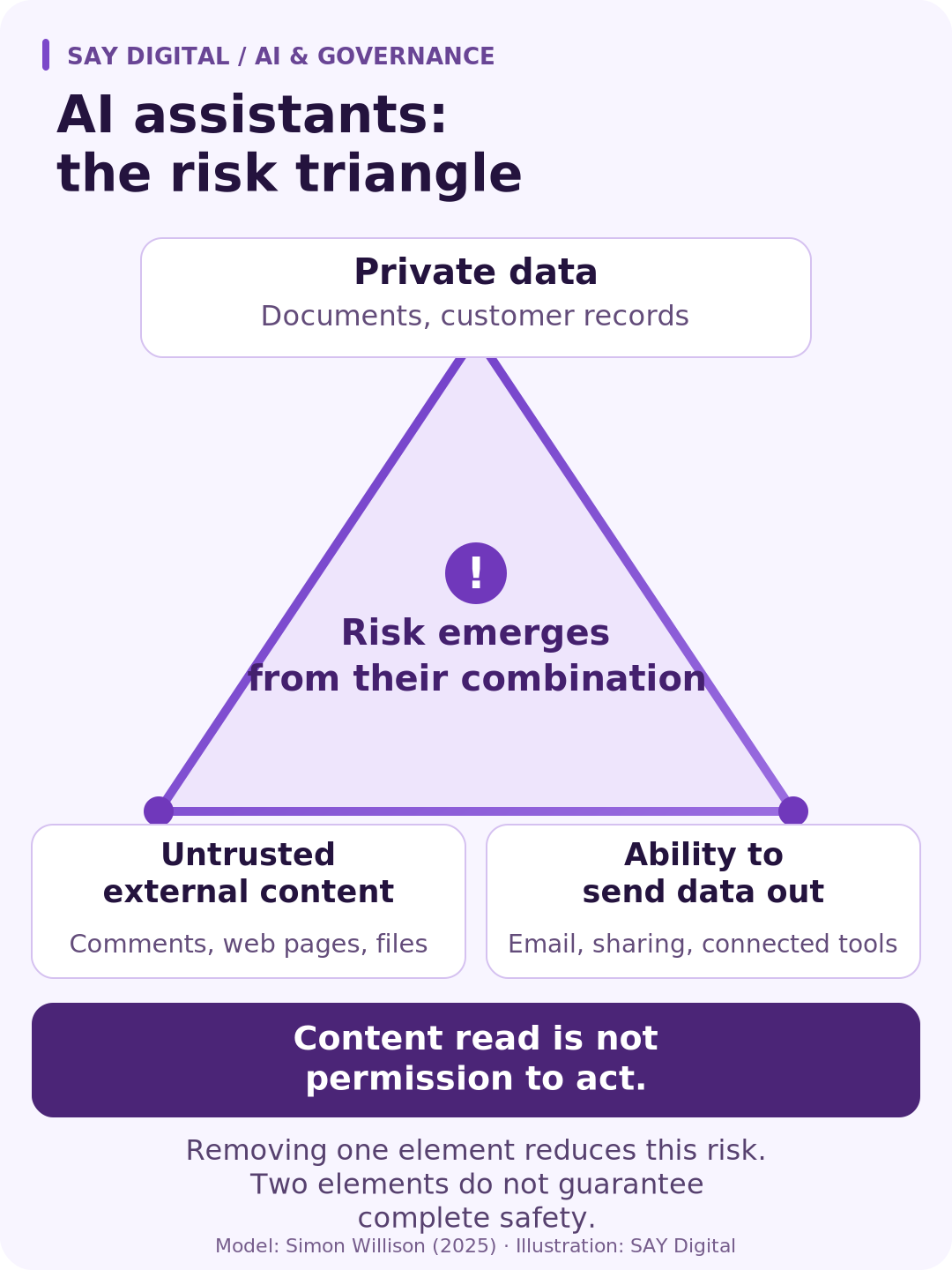
In our fictional example, the Reddit comment encountered during research provides the external input, the sales folder provides the private data and the transmission tool provides the route out. Bringing all three into one workflow creates a path for diversion if permissions and controls allow it.
Two elements do not mean “no risk”
Removing one capability may break this particular chain of data leakage. It does not prevent every harmful outcome. An assistant that cannot send email can still write a misleading draft. One with no access to confidential records can still take an unauthorised business action if it has other permissions.
“Cannot send” also needs checking. Disabling email is not enough if another tool can publish, share or transmit information. Review the routes by which data can leave, not just the connector names.
Running a model locally does not remove its tools’ permissions either. Keeping inference on your hardware and controlling what an assistant can access or transmit are separate decisions.
What should you authorise before connecting the assistant?
Comparing solutions on the web does not require access to sales folders or permission to send their contents out. Adding internal context may require access to a specific folder, without permission to transmit it. Use the following decision guide to separate these tasks before granting access.
Researching and comparing on the web
Business decision: allow access to relevant public sources, without automatic transmission or broad access to sensitive folders.
Evidence to request: the assistant completes the comparison without following instructions in comments or pages it reads, opening unrelated documents or transmitting information.
Drafting a reply using internal information
Business decision: limit access to the necessary documents and produce a draft. A person checks both the content and the recipient before sending.
Evidence to request: approval covers the exact message and any attachments, not a general permission to “continue”.
Sending without human review
Business decision: keep this autonomy narrow: defined message categories, permitted data and recipients. If the system cannot enforce those limits, keep the workflow in draft mode.
Evidence to request: tool-level controls block an out-of-scope transmission even if the model proposes it.
Working on a confidential case file
Business decision: restrict reading to the relevant file, close unnecessary routes out and name the person responsible for sensitive disclosures.
Evidence to request: access and sending attempts are traceable, and the team knows how to suspend the assistant when something goes wrong.
Connectors and downstream systems must enforce these boundaries. They cannot exist only as instructions to the model. OWASP recommends least privilege, authorisation enforced by downstream systems and human approval for high-impact actions. A rule such as “never disclose confidential data” may guide the model, but it does not replace those controls.
Ask for evidence on fictional data before extending access
The business owner and technical team should be able to verify three things: outside content cannot change the authorised task; an out-of-scope document remains inaccessible; and a sensitive transmission waits for the required approval. Run these checks with fictional data rather than exposing customer records to demonstrate the problem.
OpenAI’s guidance on agent safety recommends limiting the influence of untrusted data, structuring exchanges and using tool approvals. It also states that structure and isolation reduce risk without fully removing it. A successful test is therefore not a permanent guarantee. Recheck the boundaries when the tools, permissions or task change.
For this research assistant, the Say Digital Framework starts with a specific choice: compare public sources only, also consult an internal folder or transmit the result? That choice sets the prototype’s permissions and the refusals to verify before controlled deployment. If file sharing is added later, test the outbound controls again: the assistant now has a capability it did not have in the first trial.
Adding a sending tool also changes who must approve the result before it leaves the business. Our guide to AI agents in business explains the distinction between an agent’s tools, its mission and human oversight.
Sources and limitations
Sources checked on 18 October 2026. The Reddit scenario is fictional: none of the sources cited here is presented as evidence of such a real incident. The business recommendations are an editorial synthesis, not a security certification or a report of a customer audit.
- Simon Willison — The lethal trifecta for AI agents, 16 June 2025: the original three-capability model.
- OWASP — LLM01 Prompt Injection: direct and indirect injection, and prevention limitations.
- OWASP — LLM06 Excessive Agency: minimum permissions, authorisation and human oversight.
- OpenAI — Safety in building agents: design guidance for its agent environment, not a guarantee that risk can be eliminated.


