Copilot Studio for support and HR teams: scoping an agent connected to your knowledge
Microsoft Copilot Studio is a low-code environment for building agents and automations connected to your data and applications. You define their instructions, knowledge sources and permitted actions. It is not simply Microsoft 365 Copilot chat: Studio lets you design and manage purpose-built solutions. Available integrations and publishing options depend on your configuration and the plans you purchase.
Short on time? Watch the article essentials.
French audio · English captions.
Who is it for?
Consider it if your support, HR or operations teams handle recurring requests and have reliable documentation. An existing Microsoft environment may help with some integrations, but does not guarantee straightforward implementation. Assign a business owner, an administrator and someone responsible for content maintenance. Without those roles, improving your knowledge base may be a better first step than launching an ambitious agent.
What SAY Digital can deliver
SAY Digital can help you scope a use case, map knowledge sources and define permitted actions. The work can include a prototype, required connections, a permissions matrix and test scenarios. We can also plan human approval, manual fallback and operating documentation. Scope depends on reviewing your environment; neither universal compatibility nor a quantified performance improvement should be assumed.
When to choose it, and when to avoid it
Explore this option for a bounded business assistant with identified sources and verifiable outcomes. Test incomplete answers, ambiguous requests and denied access. Avoid broad deployment when documents contradict each other or nobody can supervise actions. For sensitive decisions, a generated answer is not a substitute for validation by an authorised person.
Check data permissions, connection identities and sharing rules separately. Do not assume every channel automatically applies the access controls you expect. Approvals must be explicitly configured in the chosen process; having approval features available does not make every action safe by default. Document who may approve each operation and what happens when approval is refused.
An illustrative example
Imagine an internal agent explaining your purchasing procedure using approved documents. It could collect the required information, prepare a request and route it to a manager. Before anything is recorded in a business system, verify identity, mandatory fields and authorisation. If a source is missing or a connection fails, the agent should direct the user to a person. This is an illustrative scenario, not a customer testimonial or a promise of results.
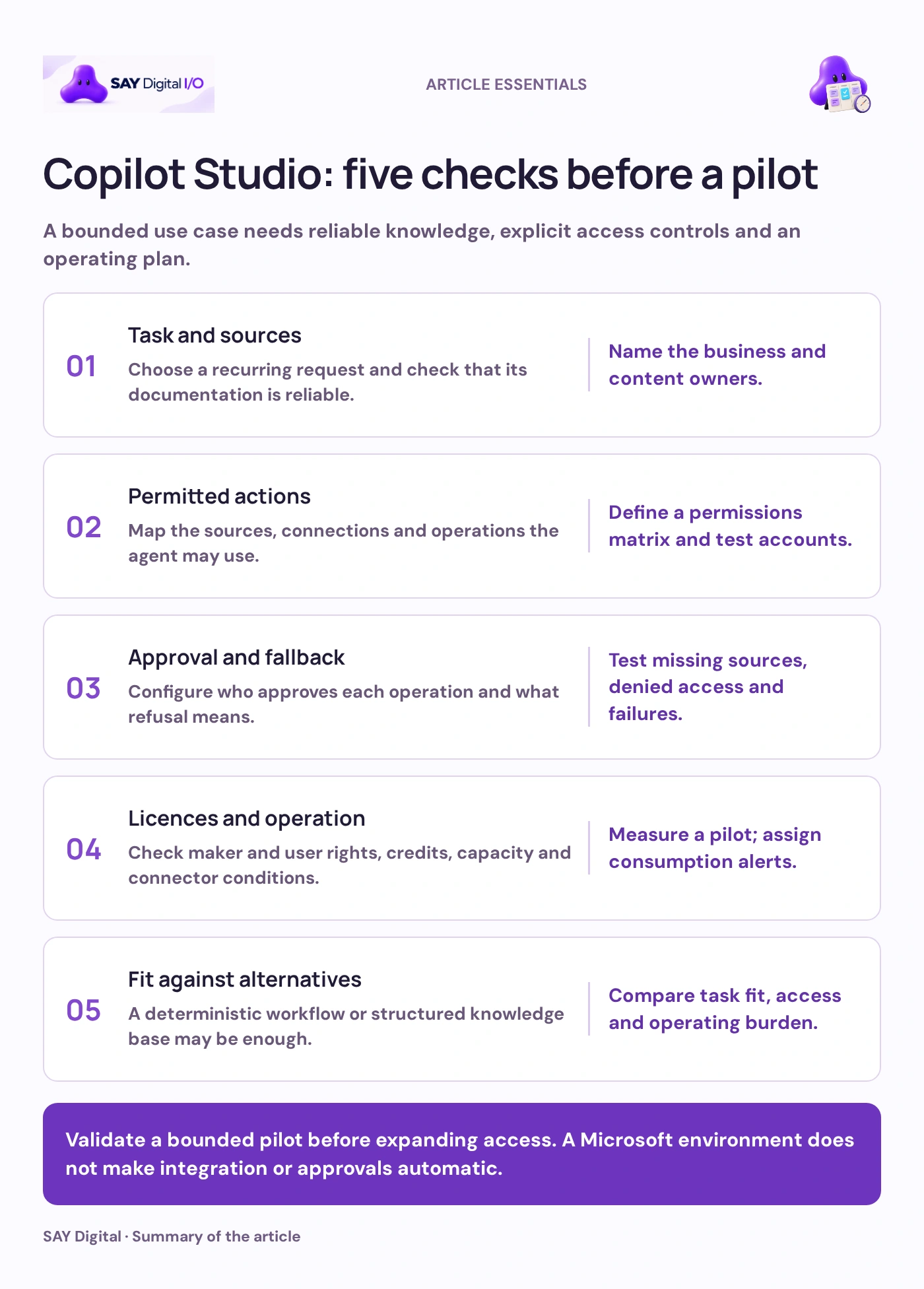
Open the full-size infographic ↗
Costs, capacity, credits and licences
Your budget involves more than building an agent. Depending on the available offers and applicable billing arrangements, examine credit consumption, available capacity, required licences and connector conditions. An existing Microsoft 365 licence is not evidence that every Studio use case is included. Check the entitlements for both makers and intended users rather than assuming one licence covers everyone.
Also verify publishing rights, supported channels, environments, associated services and their limits. Model several conversation and action volumes, then measure a pilot. Include documentation cleanup, testing, maintenance and consumption monitoring in the budget. Commercial arrangements can change: confirm contractual terms before committing rather than extrapolating a universal price. Agree on ownership of usage alerts and a procedure for handling unexpected consumption.
What are the alternatives?
Power Automate may be sufficient for a deterministic process without conversation. n8n or Make are options for coordinating multiple applications, subject to connector availability and appropriate governance. A custom application offers more control but requires development and ongoing support. For simple information retrieval, a well-structured knowledge base may be preferable. Compare the actual task, operational burden and access requirements rather than choosing solely because a product includes AI.
FAQ
Does Copilot Studio replace Microsoft 365 Copilot?
No. Some experiences overlap, but designing a specific agent and using a workplace assistant address different needs. Check which capability your project actually requires.
Can we connect all our data?
Not by default. Assess each source, connector, permission and processing rule before exposing information. Test with accounts that represent different access levels.
Can we publish to every channel immediately?
No. Availability depends on the channel, authentication, configuration and plan. Validate each user journey, including failures and escalation, before expanding access.
Scope your project
Would you like to assess whether this approach fits your needs? Discuss your project with SAY Digital and define an initial scope that you can test.