Less friction. Greater clarity in every user journey.
From the first prototype to redesigning an existing product, SAY connects strategy, user experience and interfaces. More than attractive screens: well-understood journeys, planned states and a prepared handoff to development. A journey that stalls, a redesign to begin or inconsistent interfaces: we scope the right engagement for your situation.
One coherent system. Not isolated building blocks.
01ObserveFriction identified
02DesignSimplified journey
03PrototypeHypothesis made tangible
04TestPrototype compared / tested
ONE JOURNEY, FOUR DECISIONS
Compare before developing.
The simplified prototype is compared with the original hypothesis to decide what comes next.
Illustrative approach · not a client result
Contact enquiryPrototype to compare
Your name
Your role
Your postal address
Your needs
Continue →Two fields to reconsiderA · original journey B · simplified journey
The challenges we address
Understand users and friction points
Design the journeys, then the interfaces
Test the prototype and prepare the handoff
Depending on your challenge: a UX audit to prioritise friction points, UI design or redesign, a prototype to test a hypothesis, or a design system to align interfaces.
Deliverables to move you forward
User journeys and screen architecture
Mockups and interactive prototype
Components, states and design specifications
Depending on the agreed scope, Figma files are documented and handed over to your development team, with the discussions needed to prepare implementation.
A standalone engagement to scope your idea, map out journeys and test a prototype. You leave with an actionable direction, without having to commit to full development from the outset.
We review your situation, access and constraints to agree on a useful scope and acceptance criteria.
02
Bring the expertise together
SAY assembles and leads the right senior team. You do not have to manage a directory of freelancers or a succession of isolated providers.
03
Deliver and hand over
Deliverables are reviewed with you. Documentation, limitations and operational next steps are defined for each engagement.
Our work
Discover SAY Digital’s projects.
Websites, online shops and applications designed to bring our clients’ ambitions to life.
Tastiie — from interest to a tasting enquiry. Real navigation, without submission.
Tastiie · UI, UX & AI-assisted design
Create appetite. Guide the choice.
UI — A welcoming identity, appetising photos and easy-to-find meal packages.
UX — Explore the offer, understand prices and conditions, then specify your needs in a tasting enquiry.
UX & AI — Another journey takes shape in the business prototype: an assistant prepares the manager’s work, from a WhatsApp order to production and delivery preparations. Explore the illustrative scenario below; the video shows only the website.
DiscoverCompare meal packagesSpecify your needs
Tastiie · Business application prototype
AI prepares. The manager stays in control.
Beyond the website, a prototype explores the manager’s day-to-day work: taking an order on WhatsApp, checking business knowledge in the Brain, then preparing orders, the chef’s task sheet, supplier requirements and delivery rounds. The design makes each handoff visible, without hiding the human approvals.
One sample order, from conversation to team preparations.
Demo data
01 → WhatsApp enquiry
Simulated conversation
Hello, for Thursday: 24 meals, including 6 vegetarian. Delivery to the office at 12:00. Is that possible?
I’ll prepare the enquiry and check the offer and conditions. The manager will confirm the menu, time slot and quote.
No message sent. No customer contact details used.
02 → Brain check
Business knowledge to consult
✓Menus & recipes Meal packages and vegetarian options
✓Ordering conditions Lead times, minimum orders and delivery
✓Service practices Packing and preparation
Structured business knowledge, with no identifiable customer data. Availability and allergens still require human validation.
03 Order sheet
Draft · DEMO-024
Quantity24 meals
Breakdown18 standard · 6 vegetarian
Preferred time slotThursday · 12:00
Next stepManager approval
The assistant brings the information together; it does not confirm the order on the manager’s behalf.
Checkpoint · the manager
Review quantities, confirm the menu and conditions, decide on requirements and approve preparations.
To approve · simulation
After manager approval → preparing the handoffs
Production & labels
Task sheet to review
DEMO-024Thursday · lunch service18 standard mealsMenu to confirm6 vegetarian mealsRecipe to confirm
Prepare & pack24 portionsQuantities to checkLabellingAllergens: human validation required
A preparation pack for the chef, not an executed production order.
Supplier preparation
Requirements to confirm
Recipes → ingredientsBased on 24 portionsConsolidate requirementsBased on approved menusCheck against stockAvailability to check
Supply listQuantities to adjustBy the manager and chefDraft onlyNo purchase initiated
The manager decides before any contact is made. No email or purchase order is sent.
Delivery rounds · preparation
Proposal to approve
Lunchtime delivery roundThursday · DEMO-024Collection from the kitchen11:15 · working hypothesisPreferred delivery12:00 · demo office
24 takeaway mealsAddress to confirmBy the managerDriver to assignNo delivery round started
Illustrative organisation: time slots, assignments and routes still require human confirmation.
Concept mockup inspired by the prototype interface. This scenario demonstrates neither a production WhatsApp / AI connection nor a real order, payment or operational result.
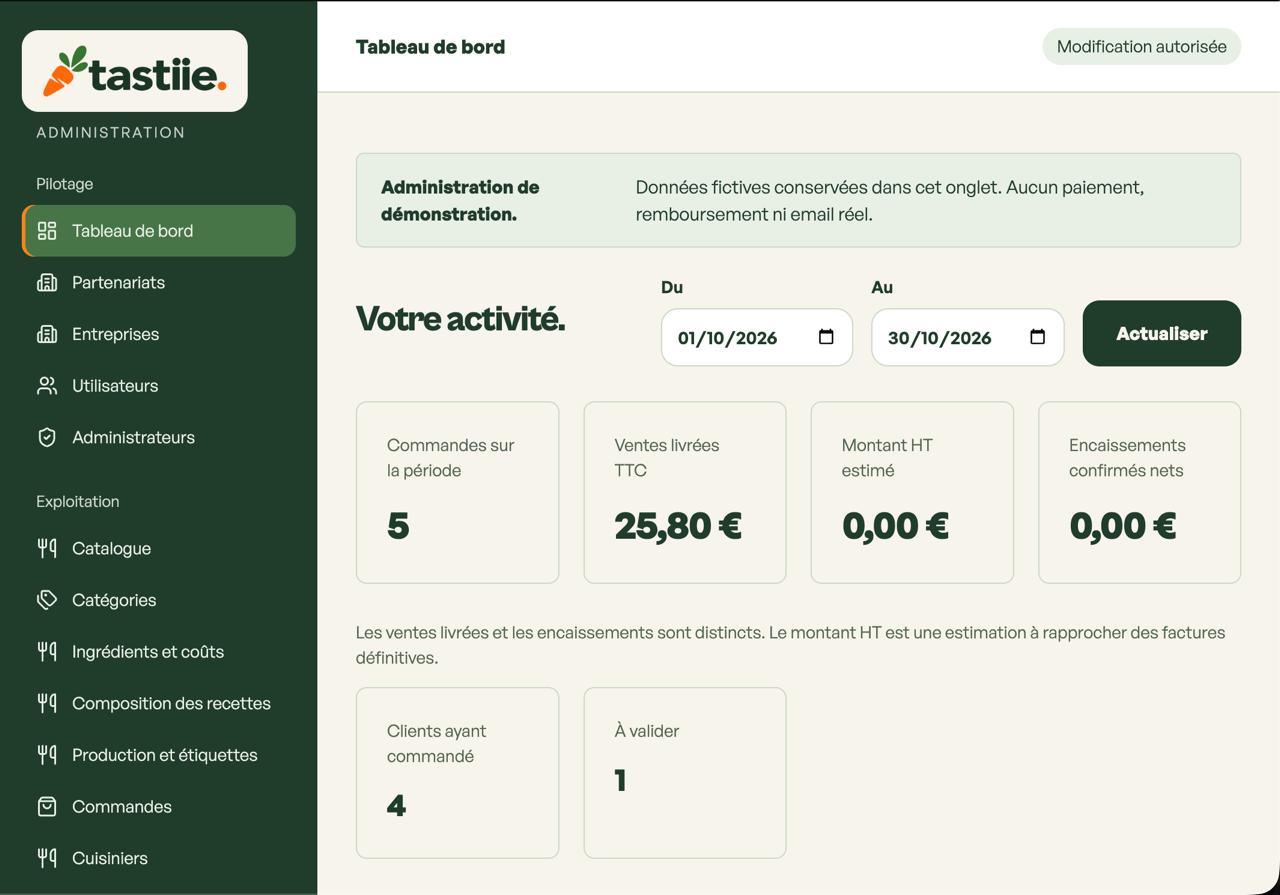
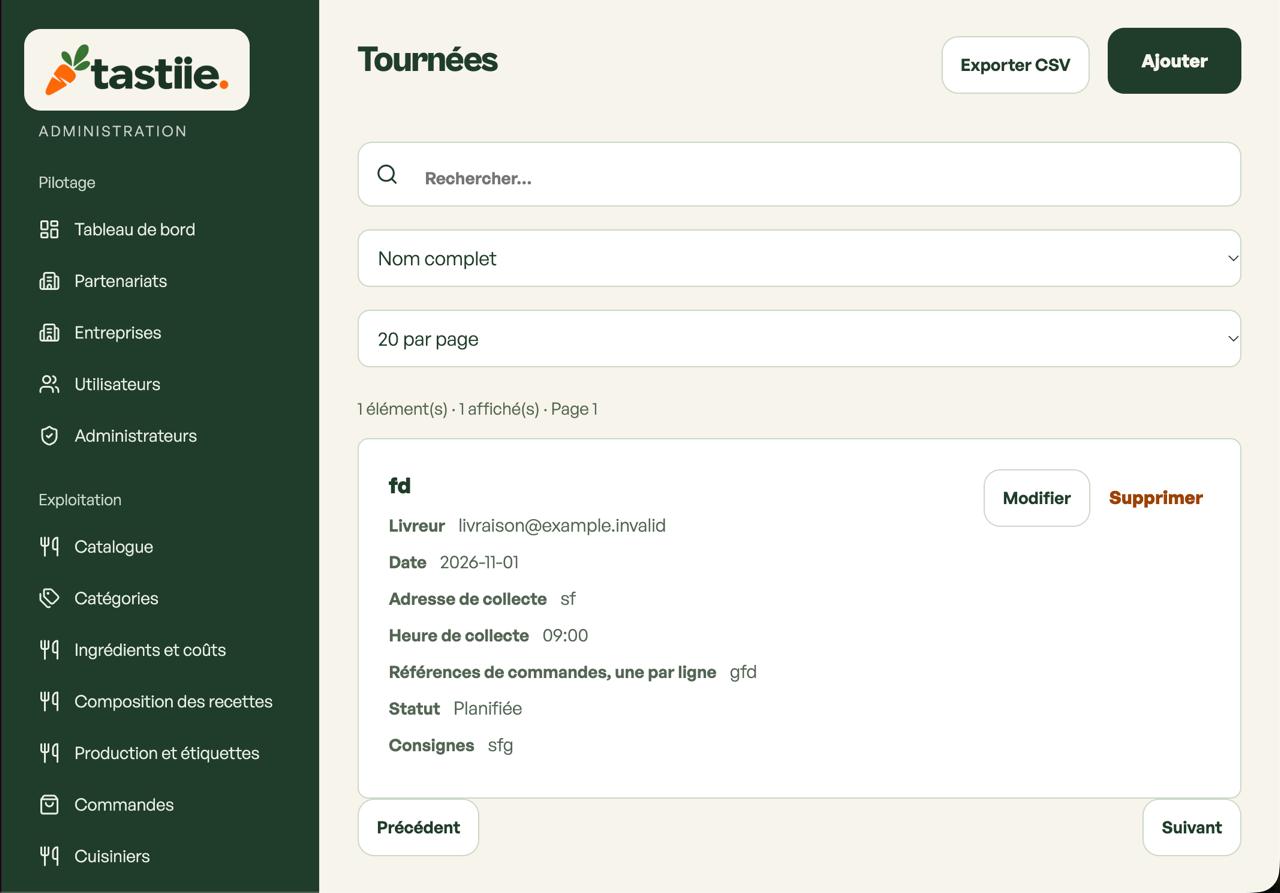
The prototype · dashboardOriginal supplied screenshot. The metrics shown are demo data, not client results. Tap the image to enlarge it.The prototype · delivery round managementUnretouched original screenshot, with its test entries. The mockup above illustrates a separate scenario, not a real delivery round.
Can we improve an interface without rebuilding everything?
Yes. A journey audit identifies friction and prioritises improvements. We keep what works and focus on useful changes, without committing to a full redesign when it is not needed. Explore UI/UX design and redesign
What does our development team receive?
Depending on the agreed scope: Figma files, prototypes, components, interface states and documented specifications. We prepare their handoff and coordinate with your developers. The precise content is scoped with you: it is not an identical package for every engagement.
Do we always need to start with a Design Sprint?
No. A Design Sprint is relevant when the challenge needs scoping and an uncertainty is worth testing before building. If the need is already clear, a focused audit, design or prototyping engagement may be enough. Explore the Design Sprint