


Relay.app vs Lindy.ai: email and lead handling after Relay.app’s shutdown
Relay.app vs Lindy.ai: email and lead handling after Relay.app’s shutdown
French synthetic audio and French on-screen text. English subtitles are enabled; use the captions control if needed.
French synthetic audio and French on-screen text. English subtitles are enabled; use the captions control if needed.
A Relay.app vs Lindy.ai comparison may still appear in search results, but its starting point has changed: Relay.app says it shut down in September 2026. Its official site also states that accounts, workflows and run history have been permanently deleted. Relay.app is therefore no longer a deployment option for your email and lead handling.
Lindy.ai remains a candidate to evaluate, not an automatically approved replacement. Its current documentation describes an assistant connected to your tools, including help with email, calendars, follow-ups and certain CRM tasks. The decision is whether that workflow fits your team.
Service availability settles the first question. The remaining decisions require a trial on your actual work.
Relay.app has closed: an old feature table is not a buying guide
Relay.app’s official page announces shutdown and deletion of associated service data. Articles describing its automation or human-approval features may reflect a historical product, not an available service. An archived homepage does not bring that product back.
If you previously used Relay.app, start with your own documentation, exports already retained and business applications to reconstruct the requirement. Do not assume the service can recover run history when its announcement states permanent deletion. Reconstructing those processes is a separate project from selecting a new assistant.
What Lindy currently documents for email and teamwork
Lindy’s documentation describes inbox and calendar help, meeting preparation and follow-ups. It also presents shared work in Slack, where a team can request research, a report or a CRM update. These are vendor-documented capabilities; their value depends on the tools connected and the actions actually available in your setup.
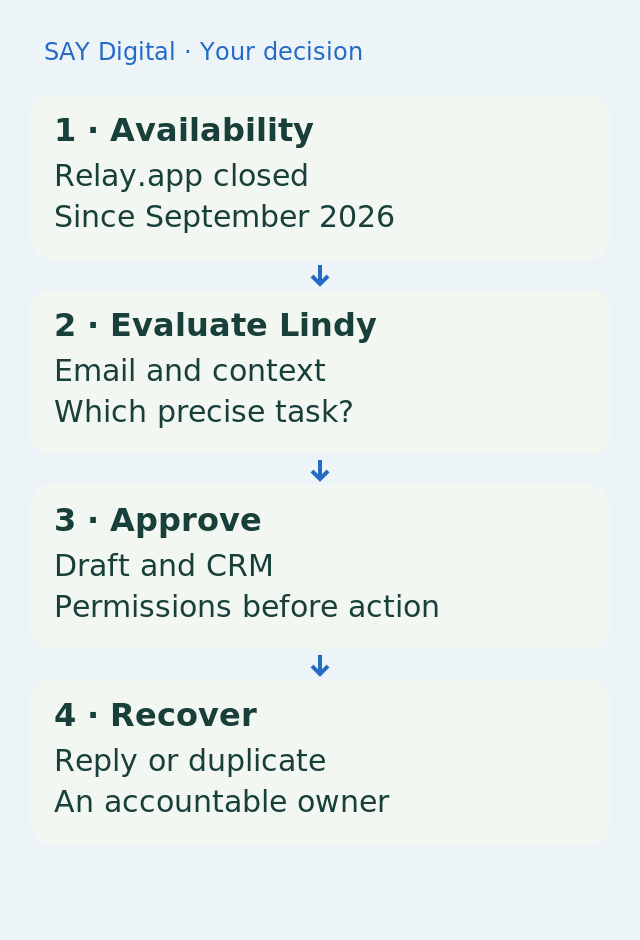
Before a trial, name the job: classify incoming messages, prepare a draft, create a lead or update an existing record. These tasks need different permissions. Reading a message to suggest a reply and sending that reply to a customer are separate actions. Do not hide that distinction inside a broad promise of autonomous inbox management.
A keyword does not qualify a sales lead
Illustrative example: a prospect asks whether your agency can take over a website before a particular date. The assistant may extract the requirement, stated deadline and contact details, then prepare a record for review. It should not turn a requested date into a commercial commitment or fill in a budget the prospect never provided.
The workflow first searches for an existing record, distinguishing new contacts from known customers. Link the enquiry to its source message so the salesperson can recover the context. Useful qualification leaves missing information visible rather than hiding it inside a polished summary.
Specify who approves replies and CRM changes
Lindy documents context-sharing choices and approval of changes in shared Slack conversations. Check the exact controls for your channel and action: a rule documented for a shared thread does not establish coverage of every email or integration.
Start with a scope in which the assistant prepares and your team approves. Define what it may write to the CRM, who approves sending and when an enquiry returns to sales. Customer messages remain subject to your data-handling obligations. Limiting connected inboxes and folders also makes it easier to understand what the assistant can access.
Run the revealing test before delegating follow-up
Use a complete enquiry, an ambiguous message, an existing customer and an interruption after a CRM write. Check the draft, created fields, source-message reference and available recovery. If a write succeeded but confirmation was lost, retrying must not create another lead or send another response.
Choose Lindy if those trials establish that the useful actions are available, understandable and appropriately controlled for your team. Otherwise, retain human handling or examine another architecture against the same requirement. Relay.app’s closure calls for an updated comparison, not an automatic purchase of the other product in the table.
Sources and reference points
- Relay.app officially announces shutdown and permanent deletion — accessed 2026-11-04
- Lindy describes work across connected business tools — accessed 2026-11-04
- Lindy documents inbox, calendar and follow-up assistance — accessed 2026-11-04
- Lindy documents shared-team CRM tasks — accessed 2026-11-04
- Lindy documents personal/team context and shared-thread approval controls — accessed 2026-11-04
In the interrupted CRM case, keep a source-message reference so the team can check the existing lead before retrying.
What should your team do next?
The SAY Digital agency can scope your email-to-CRM journey before selecting an assistant. Define a CloudWorker through what it prepares, what it may change and what it hands to sales, then test ambiguity and recovery. Rebuilding any previous workflows is a separate scope.