


Automating PDF filling: when to use PDFMonkey, Make or n8n
Automating PDF filling: when to use PDFMonkey, Make or n8n
French synthetic audio and French on-screen text. English subtitles are enabled; use the captions control if needed.
French synthetic audio and French on-screen text. English subtitles are enabled; use the captions control if needed.
Your team copies CRM details into a certificate, then emails the PDF. Before choosing PDFMonkey, Make or n8n, look at the actual document. Must you fill an existing form, or can you generate your own layout? That distinction changes the solution.
PDFMonkey generates documents from templates and data. Make and n8n can organise the workflow that retrieves information, calls the document engine and delivers the result. Neither workflow platform, on its own, establishes that you can edit the particular PDF a partner requires.
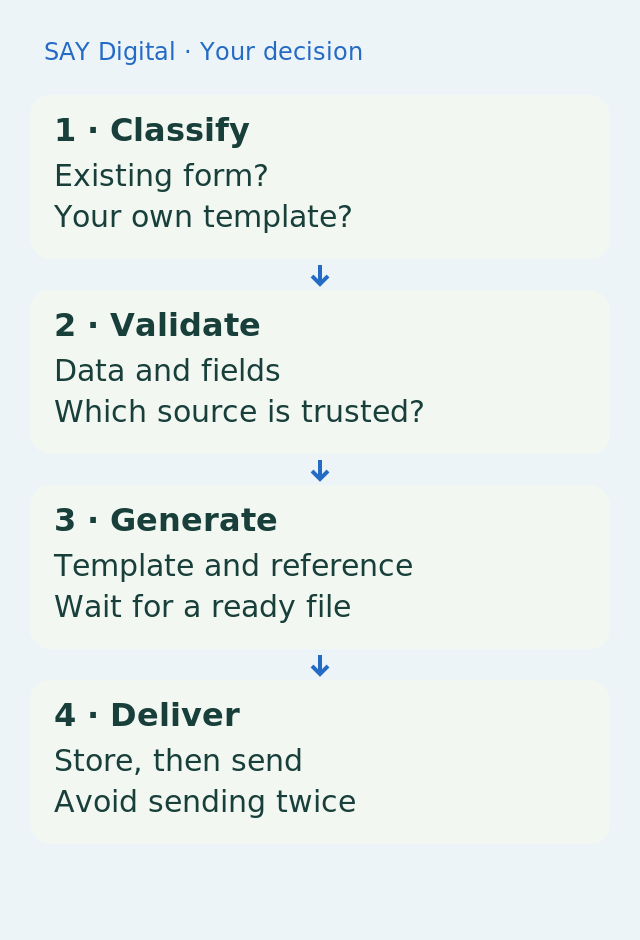
Classify the file first, so you do not rebuild a form whose layout must remain unchanged.
Filling a PDF and generating one are different jobs
A PDF may contain interactive form fields, a fixed page layout or only a scanned image. In the first case, you need an engine that recognises and fills the fields without damaging the document. Overlaying text on a fixed page depends on exact coordinates. A scan may require text recognition, but reading a label does not turn the image into a form.
When you control the template, PDFMonkey can create a new PDF from a layout and variables. Its documentation also describes generating interactive forms using markers inside its own templates. That does not establish that any externally supplied form can be imported and filled without adaptation. Test the required file before selecting an engine.
Prepare the data before styling the document
Illustrative example: a training company generates a certificate from an approved registration. The name, dates and course title come from validated records, and the certificate retains a reference to that registration. A missing required value stops generation and returns a task to the team. A model should not invent a date or silently change a person’s name.
Define the data contract: source field, template variable, expected format and behaviour when a value is absent. Check accented characters, dates, amounts and long text. A file can be generated successfully while showing a truncated name or an extra blank page. Rendering is therefore part of acceptance, not just presentation.
PDFMonkey with Make: from trigger to attachment
PDFMonkey documents a Make module that maps data from earlier steps into a published template. A form submission or CRM event can start the workflow. After generation, retrieve the actual file if you need to archive it or attach it to an email; saving its download address alone may not be enough.
The connector documentation states that the download link expires after one hour. If the certificate must remain available later, store the file with appropriate access controls instead of relying on a temporary URL in a customer record. Storage location, retention and permissions should follow your organisation’s rules.
PDFMonkey with n8n: retain the generation state
PDFMonkey documents an n8n node for generating, retrieving and downloading documents. Check its availability and version in your environment. An HTTP request may also connect the workflow to the service, depending on your chosen approach. A logo in an integration catalogue is not a complete implementation decision.
Document generation can be asynchronous: the request is accepted before the file is ready. Retain the document ID, wait for a final status or the supported notification, then download the result. A timeout does not prove that nothing was created. Before retrying, look up the document already requested to avoid duplicate certificates and emails.
Test difficult documents, not just an empty template
Use a long name, a list spanning several pages, a missing field and a delivery failure. Compare source values with visible PDF content and check the reference, pagination and recipients. If a signature is required, add a separate signing step: generating a PDF is not the same as signing it.
Choose PDFMonkey when you control the template being generated. For a fixed external form, first validate a filling engine compatible with that file. Then select Make or n8n based on connections, recovery and maintenance ownership. The useful endpoint is the correct document in a place your team can find, not merely an accepted generation request.
Sources and reference points
- PDFMonkey generates PDFs from templates — accessed 2026-11-04
- Generation and file availability are separate stages — accessed 2026-11-04
- PDFMonkey can generate interactive forms from its templates — accessed 2026-11-04
- Download links expire; retain the generated file when needed — accessed 2026-11-04
- PDFMonkey documents integration with n8n — accessed 2026-11-04
For a generated document whose confirmation is lost, define which identifier proves that generation has already occurred before retrying.
What should your team do next?
The SAY Digital agency can scope your document CloudWorker around a representative example: permitted data, template, checks and delivery. Define the first deliverable as a correct, retrievable file with recovery steps your team can understand.