



WordPress vs Webflow: choosing a connected website for your SME
WordPress vs Webflow: choosing a connected website for your SME
French synthetic audio and French on-screen text. English subtitles are enabled; use the captions control if needed.
French synthetic audio and French on-screen text. English subtitles are enabled; use the captions control if needed.
Your next website needs to do more than look good. Your team must be able to publish an offer, send an enquiry to the CRM and understand why a contact has not arrived. WordPress and Webflow can both support that journey; their names do not make the decision for you.
Consider WordPress when your project depends on a particular ecosystem of extensions, content or custom rules. Consider Webflow when your team wants to design visually around a defined content model. In either case, validate the choice with your actual editors, forms and business tools.
Start with a page that needs to generate an enquiry, then follow that enquiry into your CRM.
Start with the person who will publish
Ask your marketing lead to change an offer and prepare a news item. Check what they can edit without damaging the layout: headings, images, links, drafts and translations. A tool that suits its designer may still be difficult for the person using it every week.
In WordPress, the theme, editor and extensions shape that experience. In Webflow, CMS collection structure and the project’s editing capabilities play an important role. Compare a defined setup in each platform rather than abstract promises of freedom or simplicity.
Both CMS platforms connect to other systems, but specifics matter
WordPress documents a REST interface for reading and managing content from other applications. Webflow also documents a CMS interface for creating, managing and publishing content, distinguishing staged from live content. It would be misleading to describe one as connected and the other as inherently closed.
Those capabilities do not establish that your CRM receives every required field. List what must travel: contact details, requested service, language, relevant source information and enquiry ID. Check exact actions, permissions and plan limits. An integration catalogue does not replace this mapping.
Form to CRM: test the handover that exposes hidden work
Illustrative example: an SME offers two services in French and English. An English-language enquiry creates a CRM record without its language or requested service. The contact exists, but the salesperson must repeat part of the work. The issue is data mapping, not necessarily the CMS.
Test a complete submission, a missing field and an unavailable CRM. Retain an enquiry reference and delivery state. Does the page’s “sent” message confirm only form receipt, or actual contact creation? Define what your team sees when recovery is needed, without creating two leads.
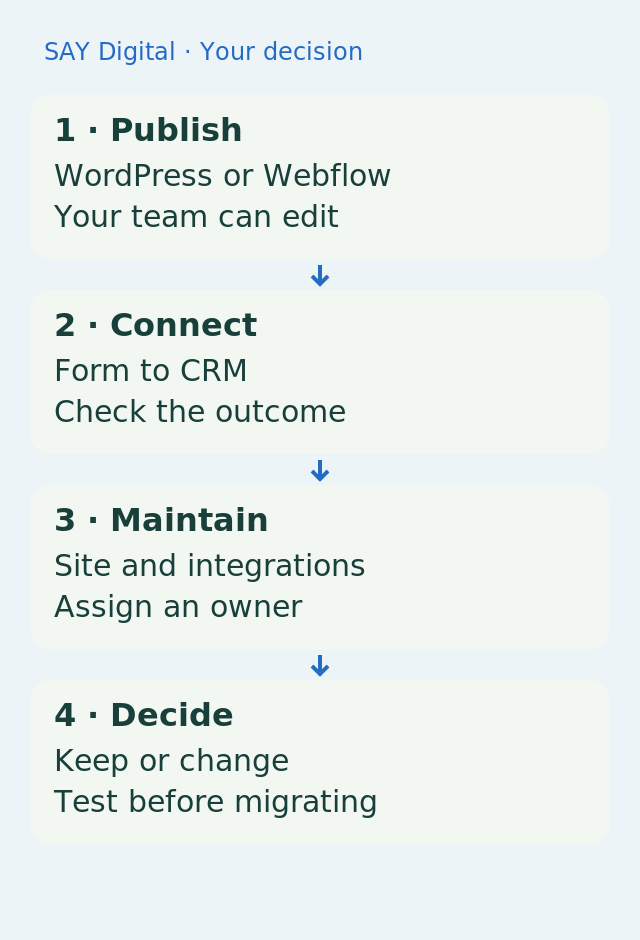
Maintenance means allocating tasks, not promising no upkeep
For WordPress, plan updates, backups and checks of extensions and the theme. The official documentation recommends a backup before updating. Managed hosting may cover some of this work; specify what is included and what remains with your partner or team.
A hosted service such as Webflow changes this allocation without removing the upkeep of forms, content and external connections. A changed CRM field can break the journey regardless of the CMS. Assign an owner for that integration before launch.
Switching platforms must solve a problem worth the migration cost
If your current WordPress site already supports publishing and enquiry delivery, moving to Webflow is not an objective in itself. The reverse is equally true. A targeted improvement to a form or editing experience may be preferable to rebuilding.
If a change is justified, inventory pages, languages, media, links and addresses to preserve. Test content transfer and prepare redirects before switching. Neither WordPress nor Webflow guarantees search rankings: useful content, accessible pages and URL continuity need checking on the website actually built.
Choose through a demonstration your team can repeat
Compare both options using a representative page, publishing task and CRM enquiry. Include integration work, necessary options, maintenance and content transfer alongside subscription or hosting costs. Keep the scope consistent between scenarios.
Choose WordPress if its setup meets your requirements and someone owns its upkeep. Choose Webflow if its design and publishing approach suits your team and the connected journey passes acceptance. Keep your existing platform when the problem lies elsewhere: that is a valid design decision too.
Sources and reference points
- WordPress provides a REST interface for external applications — accessed 2026-11-04
- Webflow provides programmable CMS content management — accessed 2026-11-04
- Webflow separates staged content from live content — accessed 2026-11-04
- WordPress updates require an explicit maintenance and recovery approach — accessed 2026-11-04
The acceptance case should follow one enquiry from its website form into the task the salesperson actually receives.
What should your team do next?
The SAY Digital agency can scope your website and its connections around this real journey without assuming a migration. A CloudWorker may then prepare or transfer information within the agreed scope; the form and business destination still need testing.