


French e-invoicing: connecting your ERP to an approved platform
French e-invoicing: connecting your ERP to an approved platform
French synthetic audio and French on-screen text. English subtitles are enabled; use the captions control if needed.
French synthetic audio and French on-screen text. English subtitles are enabled; use the captions control if needed.
Your ERP already produces invoices. Connecting it to a French approved platform means organising what leaves, what comes back and what your team corrects when processing fails. Uploading a file without retrieving its status creates another blind spot for finance.
An ordinary PDF emailed to a customer does not meet the French reform’s definition of an electronic invoice. The approved platform handles the required transmission and data exchanges. Your ERP remains the starting point for invoicing, and the connection must retain the relationship between each invoice, its submission and subsequent responses.
Read the connection in both directions: an invoice leaves, then useful processing information comes back.
France’s timetable separates receiving from issuing
The DGFiP timetable requires affected businesses of all sizes to receive electronic invoices from 1 September 2026 when their suppliers must issue them in that form. Large companies and intermediate-sized enterprises also start mandatory issuance and e-reporting on that date. SMEs and microbusinesses enter the issuance and e-reporting phase on 1 September 2027.
As of 4 November 2026, an affected SME should therefore not wait for its issuance deadline to organise receipt. Tax scope matters too: distinguish covered domestic B2B transactions, transactions requiring e-reporting and applicable exemptions. Validate this classification with your accountant before translating it into ERP rules.
Check the platform, then the actual connection your ERP supports
Consult the official approved-platform list. The tax authority distinguishes operators meeting all requirements from those still awaiting final registration subject to interoperability testing. A logo or a connector’s marketing description does not replace that check. A solution compatible with an approved platform is not, solely for that reason, an approved platform itself.
Ask your ERP vendor what is available for your selected platform: a maintained connector, file exchange or a programming interface. A documented connector may reduce custom work if it covers your transactions and responses. A bespoke connection may suit an older ERP but also introduces a component someone must maintain when either side changes.
Map data before expecting a connector to fix it
Collect a representative invoice, a credit note and a customer record. Map ERP values to the platform’s expected fields: company identity, customer SIREN where required, amounts and VAT, transaction category and relevant references. Include applicable additional information, such as a delivery address that differs from the billing address.
Illustrative example: an SME stores a customer’s trading name but not the identifier needed for routing. A technical submission may leave the ERP while business processing fails. Correct the source record, validate it and retry the affected document. The connector should not invent an identity simply to push the invoice through.
Bring statuses, reasons and incoming invoices back into the ERP
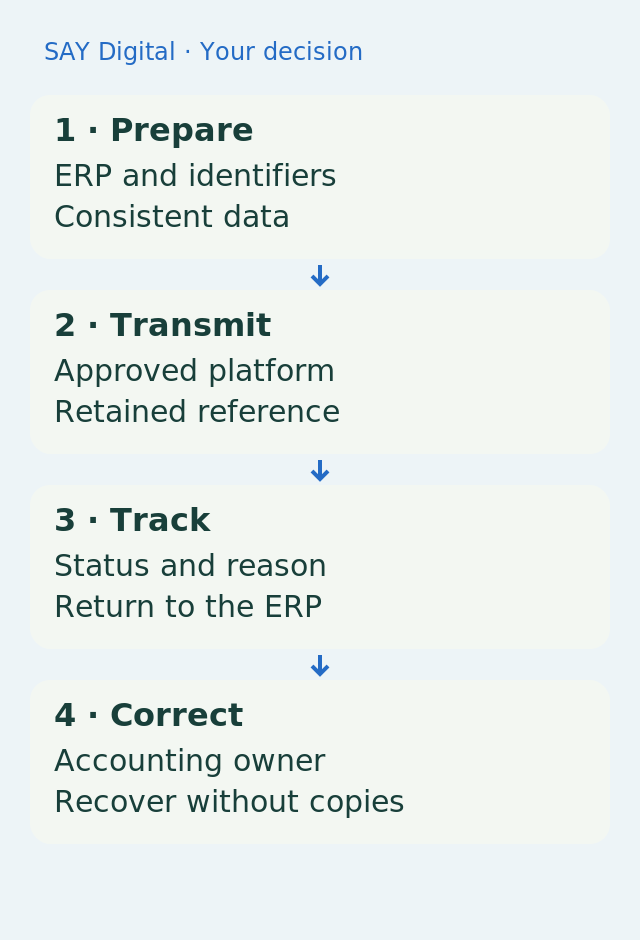
Retain a stable reference between each ERP invoice and its platform submission. Separate technical acknowledgement from business outcome, then translate platform statuses and reasons into visible actions: waiting, correction or accounting review. Exact state names depend on the specification used; agree this mapping with the implementation partner.
If a response is lost after submission, look up the existing submission before creating another. For incoming invoices, also define supplier matching, document handling and accounting approval. Sending and receiving are separate acceptance paths: a working export does not establish that your team can process purchases.
Acceptance ends with a usable accounting task
Test a valid invoice, a missing value, a credit note, a suspected duplicate and a temporary outage. For each, compare the source document, platform response, ERP visibility and the person responsible for recovery. Where applicable, include required transaction or payment data: e-reporting is not simply another name for sending an invoice.
Select the connection that makes these situations understandable. AI may help classify an exception or draft a correction request. It should not improvise VAT treatment, legal identifiers or accounting entries to remove a rejection. The accountable person retains the correction decision.
Sources and reference points
- Receipt phase starts on 1 September 2026 — accessed 2026-11-04
- SME and microbusiness issuance phase starts on 1 September 2027 — accessed 2026-11-04
- An ordinary emailed PDF does not meet the reform definition — accessed 2026-11-04
- Verify the platform’s official registration status — accessed 2026-11-04
- Customer identity and transaction data need mapping — accessed 2026-11-04
For a submission without a response, retain both the ERP reference and the platform reference so accounting can check what has already happened.
What should your team do next?
The SAY Digital agency can scope the connection between your ERP, approved platform and accounting team. A CloudWorker can prepare checks and flag exceptions within an agreed scope, while your responsible professionals retain tax and accounting validation.