


Make vs n8n: which should your SME choose for an AI agent?
Make vs n8n: which should your SME choose for an AI agent?
French synthetic audio and French on-screen text. English subtitles are enabled; use the captions control if needed.
French synthetic audio and French on-screen text. English subtitles are enabled; use the captions control if needed.
Your salesperson receives an enquiry, looks up the customer in the CRM and prepares a reply. You want an AI agent to handle part of that work. Make and n8n can both connect a model to tools. The useful comparison is how you build that workflow and keep it working when an action fails.
Make is worth an initial trial for a business team assembling a workflow around available connections. Consider n8n when specific logic or infrastructure requirements justify technical ownership. These are starting points to test against your situation, not a product league table.
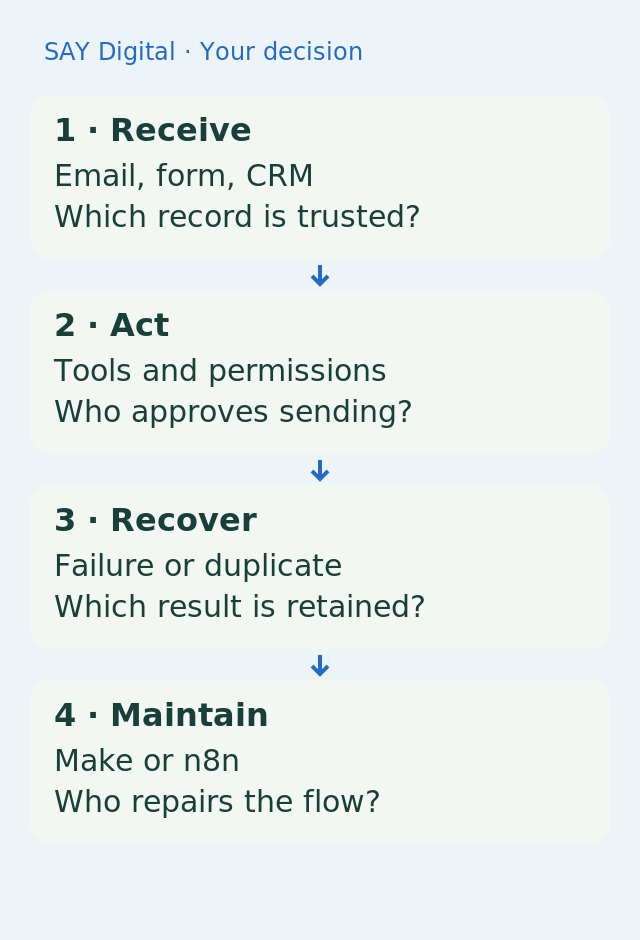
Follow an enquiry through the workflow: each handover asks a different question of your platform.
Separate fixed rules from AI judgement first
An agent does not need to make every decision. Interpreting the intent of an email may justify a language model. Looking up a customer ID, checking a required field or preventing duplicate records usually calls for explicit rules. Keeping those tasks separate reduces the places where a probabilistic answer can change your business data.
Illustrative example: a services company receives a request for a quote. The model extracts the requirement and suggests a category. The workflow then searches the CRM. If several customer records match, it opens a review task instead of choosing one arbitrarily. A salesperson approves the draft before anything is sent. This is a proposed test scenario, not a reported customer outcome.
Make: check the whole path, not just the integration name
The Make AI Agent documentation describes instructions, tools and knowledge, with triggers including emails, forms and webhooks. A webhook is a notification one application sends when an event occurs. This lets you place the agent inside a broader scenario: an incoming event starts the work and subsequent modules carry out the defined actions.
Check the exact operations your connections support. A CRM integration does not necessarily expose your custom field, attachment or search method in the module you intend to use. Take an anonymised representative request and check read access, writes, permissions and error responses. A custom API call changes the maintenance burden even when the initial setup looks straightforward.
n8n: more deployment choices still need an owner
n8n documents workflows that combine multiple model providers, tools and memory. It also supports self-hosting on your infrastructure. Those options matter when a technical requirement shapes the architecture. They do not, by themselves, make your agent reliable or establish data protection compliance.
If you choose self-hosting, assign responsibility for updates, backups, credentials and incidents. A server does not take ownership of those jobs. If nobody can maintain it, compare a hosted option or an implementation partner rather than choosing n8n solely to avoid a subscription. Keep the cost of running the system visible in the decision.
The revealing test: a write succeeds but its response is lost
Suppose the CRM creates an opportunity but the workflow never receives the confirmation. Replaying the whole sequence can create a duplicate. Give the enquiry a stable reference and check whether its opportunity already exists before creating another. This is an idempotency mechanism: it aims to prevent repeated processing of one request from causing repeated effects.
In either platform, test a complete enquiry, missing information, a rejected connection and a delayed response. Check what the operator can see and which step can be retried without resending an email that has already left the system. Being able to explain recovery to your team matters more than a demonstration in which nothing fails.
Compare costs using the same workflow
Do not compare entry prices alone. Describe the same path in both tools: trigger, CRM search, model call, approval and write. Then check billing units, plan limits, model usage and maintenance time. Reading the terms of your chosen plan during the trial is more useful than relying on a fixed price quoted in a comparison article.
Choose Make if your trial shows that your team can understand and recover this workflow without disproportionate technical dependence. Choose n8n if its adaptation options address a specific requirement and someone can operate the result. If the model is merely copying a known field, start with conventional automation: you may not need an agent at all.
Sources and reference points
- Make: instructions, tools and knowledge — accessed 2026-11-04
- n8n: models, tools and memory — accessed 2026-11-04
- n8n: self-hosting option — accessed 2026-11-04
When comparing subscriptions, include model use, integration work and recovery effort for this exact enquiry workflow.
What should your team do next?
The SAY Digital agency can scope your first CloudWorker around this concrete workflow: what it reads, what it drafts, what it may write and when it hands work back to your team. Bring a representative enquiry and a failure you want to avoid. That makes the platform choice something you can test.